travsr ask
Search the indexed graph for symbols matching a query string. Results are ranked and packed into a token budget for use in prompts or scripts.
Synopsis
travsr ask "<query>" [--format table|json]
travsr ask --examples
travsr ask --cmds
The query is a natural-language question or a bare symbol name. It runs against the repository you are standing in.
Flags
| Flag | Default | Description |
|---|---|---|
--format <fmt> | table | table or json |
--examples | (none) | List the kinds of question Travsr can answer, with runnable examples. Usable on its own, without a query |
--cmds | (none) | List every command Travsr supports, grouped by what it is for. Usable on its own, without a query |
Questions about Travsr itself
Not every question is a graph question. "What is this repo written in?" used to match "repo" against symbol names and return a screen of hits that looked like an answer. Questions about Travsr, or about the repository as a whole, are now recognised before retrieval and answered in place:
travsr ask "what is travsr?"
travsr ask "how is this different from vector search?"
travsr ask "what is this repo written in?"     # runs lang list
travsr ask "is my index up to date?"           # runs status
travsr: where does the data live?              # explicit route
The travsr: prefix resolves before the repository is even located, so it works
with no index at all.
This is deliberately strict in one direction. A question the catalogue cannot
fully account for goes to retrieval instead of being answered from it, because a
confident wrong answer to a code search is worse than a missed meta question.
what calls install_hook and how does the parser work still go to the graph.
How it works
travsr ask runs a three-stage retrieval pipeline:
- FTS5 full-text search: matches the query against symbol names, signatures, and docstrings using SQLite FTS5 trigram tokenisation.
- PPR (Personalized PageRank): re-ranks candidates by their graph centrality relative to the query symbols.
- Knapsack packing: selects the highest-scoring results that fit the token budget.
This is the same pipeline that backs the get_context MCP tool.
Output format
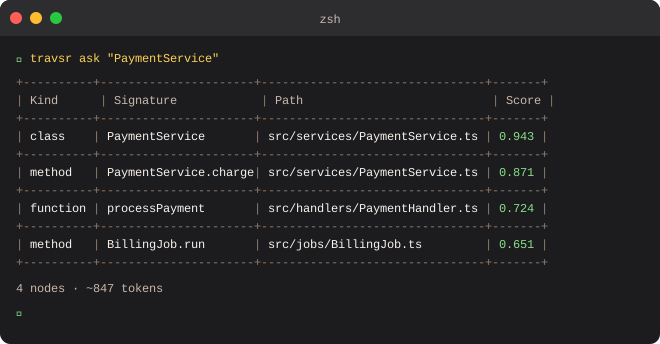
Results are printed as an ASCII table:
+----------+-----------------------------------+--------------------------------+-------+
| Kind     | Signature                         | Path                           | Score |
+----------+-----------------------------------+--------------------------------+-------+
| class    | PaymentService                    | src/services/PaymentService.ts | 0.94  |
| method   | charge(amount: number): Receipt   | src/services/PaymentService.ts | 0.91  |
| function | processPayment(req, res): void    | src/routes/payment.ts          | 0.83  |
| method   | refund(id: string): Receipt       | src/services/PaymentService.ts | 0.79  |
+----------+-----------------------------------+--------------------------------+-------+
4 nodes · ~847 tokens
The footer shows the number of nodes returned and the approximate token count.
Examples
# Symbol search
travsr ask "PaymentService"

# Broader concept search, synonym expansion applies
travsr ask "billing"

# Narrow to a specific file area
travsr ask "auth middleware"

# Machine-readable output for a script
travsr ask "UserRepository" --format json

# Find out what kinds of question are worth asking
travsr ask --examples
Synonym expansion
If you have synonyms configured (e.g. payment → billing, invoice), travsr ask "billing" will also match nodes tagged with payment and invoice. See travsr synonym.
VS Code
The Ask Symbol panel (Cmd+Shift+A) runs the same query interactively in the sidebar.